
Presentations and mobile apps for showing the work.
A private link that expires.
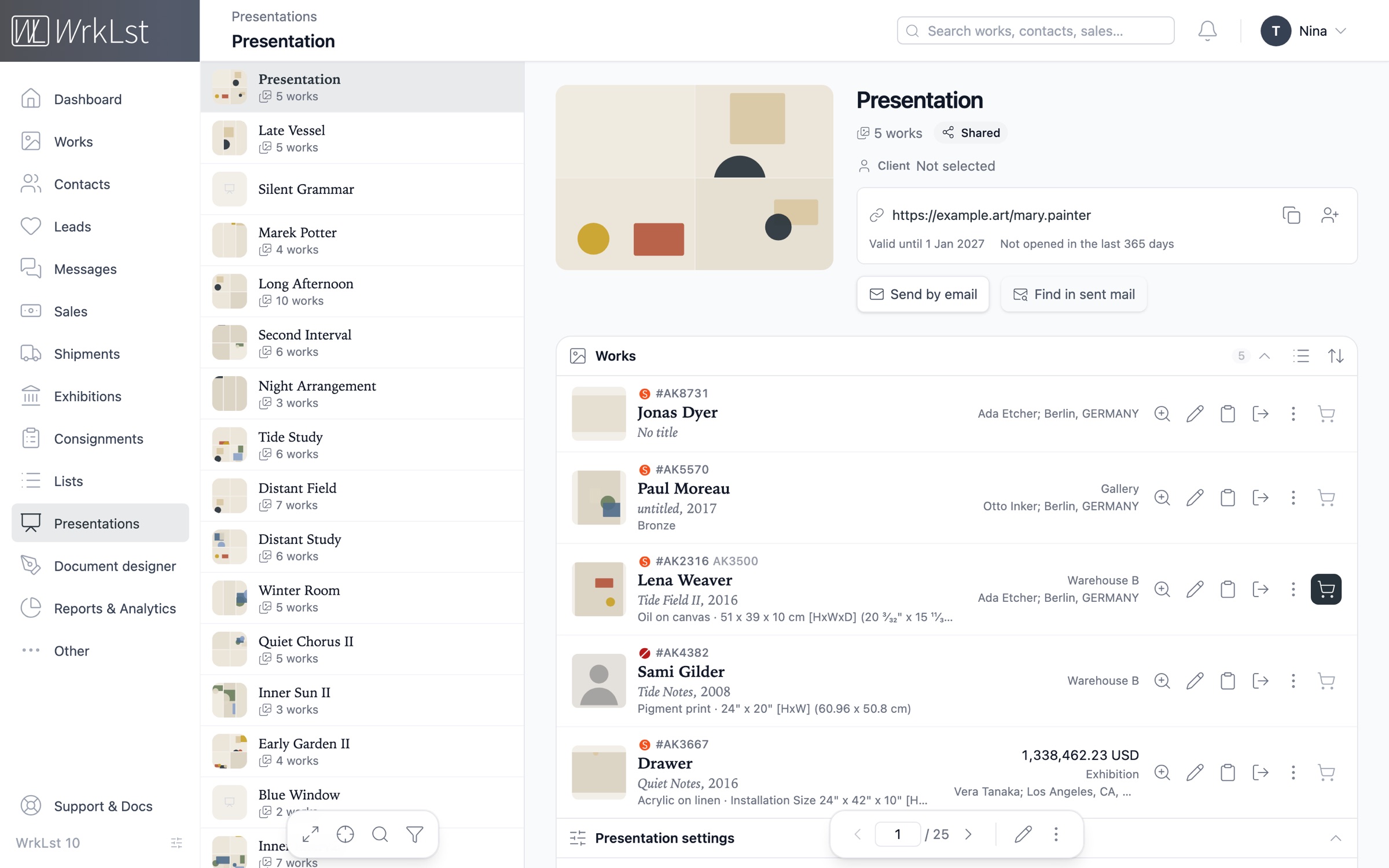
Easily set up a presentation with its name, the client, the works and the documents, the details shown on the public page, and the link with its expiry date — then send the link. You choose exactly which details of a work are included, from prices to availability; the collector sees the images with their captions and opens any work full screen with a click.
Choose Present on an exhibition or a list, and a new presentation opens with its works in the same order and its name filled in — an exhibition brings its documents along. The basket and any single work offer Present too.
Send it from WrkLst as a designed email laid out like the page. Afterwards you see how often it was opened, from where and on which devices, which documents were downloaded and which works were looked at most.
Sending it from your own mail program instead? Copy link for… names the person it is for, and Find in sent mail looks through your Sent folder — mail from Outlook, Gmail or Apple Mail included — for the link and keeps the mail on the record. Either way the presentation lists whom it was shared with, and their open leads show each day it was opened and the works looked at.
With Enquiries on, a collector gathers works in an enquiry basket and sends one enquiry: it arrives as one lead with every work on it, and by email to the representative whose card the page shows. With purchase requests on, a client can ask to buy an available work at the price shown; nothing is reserved until you decide. See the CRM
- Prices
- Prices of sold works
- Availability
- Inventory numbers
- Extended captions
- Production cost
- Unfinished work
Client
Patrick Potter
Collector · Berlin
Opened 4× · last seen 14 Oct 2026
Shared with
Patrick Potter · by email · 9 Oct 2026
Works · 4
Mary Painter
Quiet Field II, 2016
Mary Painter
Tide Notes, 1949
Nina Sculptor
Night Interval, 2024
Otto Etcher
Signal Garden, 2021
Shown to the client
A page that reads like a catalogue.
Build each presentation from blocks — a title page, text, pictures and video, your works in one, two or three columns, documents and an enquiry form — and see it as your client will while you work. It reads like a printed catalogue and opens light or dark, the way your client’s device is set; a switch on the page changes it.
Save a block for any other presentation, set your own colours and typefaces, and show a logo made for dark pages. The page speaks any of 16 languages, with a privacy policy in each unless you link your own, and your own texts can be translated block by block into further languages your client switches between.
Upload a film straight into a presentation’s video block with WrkLst Video, and take your website’s logo, typefaces and colours over into your presentations — or theirs into your website — part by part. WrkLst Video
Once your trial has become a subscription, presentations can come from an address of your own, such as view.yourgallery.com.
- Blocks
- Light & dark
- Your colours & typefaces
- Enquiry basket
- 16 languages
- Privacy policy included
A Long Afternoon
Mary Painter · Nina Sculptor
1
Mary Painter
Quiet Field II, 2016
Added2
Mary Painter
Tide Notes, 1949
Enquire3
Nina Sculptor
Night Interval, 2024
EnquireThis presentation was provided by
Anna Kiln · Sales
Present at the fair, online or offline
Our mobile apps for iOS and Android, designed for phones and tablets, deliver an optimized experience for presenting and browsing artworks, exhibitions and lists — ideal for art fairs and sales presentations, even when offline. Your archive is stored on the device, and the app keeps everything in sync automatically.
Sign in to the app with your WrkLst login, two-factor authentication included — no provisioning profile required. Connected devices are listed in your settings with the user, the device and when it last connected, and you can remove any of them from the same screen. Should a tablet go missing at the fair, a password reset signs the app out on every iPhone, iPad and Android at once.
“Great stability, even with weak internet connection.”- iOS & Android
- Phones & tablets
- Works offline
- Artworks, exhibitions & lists
- Art fairs
- Syncs automatically
#WPL164
Vera Kilnworth
Trinket, 2016
#WAR001
Marek Souza
untitled, 2017
#SIL121
Otto Etcher
iPhone drawing, 2013
#SH_StaBro
Nina Sculptor
#SH_RicArt
Lena Aoki
blib
#Shet005
Paul Printmaker
Floured II, 2008
#SHE1002
Ruth Bellamy
Untitled, 2017
#SHE1001
Mary Painter
Marek Souza
untitled, 2017
mixed media on canvas
Vera Kilnworth
Fluted Vessel II, 2025
Stoneware and glaze
29 ¼" × 14 ½" × 14 ½" [HxWxD] (74.3 × 36.83 × 36.83 cm)
Preview the work on a wall, at real size
View in Room places the work in a virtual room, showing the artwork itself rather than the wall it was photographed on, and a crop button lets you adjust the frame by hand. On iPhone, iPad and Android, AR places the work at its real size on your wall or floor through the camera.
Add a 3D model of a work — a GLB or USDZ file, from an iPhone scan, for example — and View in Room and AR show the actual object rather than a simple box.
In a presentation, your client opens any work whose measurements you show in View in Room and AR at its real size — as its 3D model where you choose — in the page’s light or dark look.
- True scale
- The artwork, not the wall
- AR on iPhone, iPad & Android
- Wall or floor
- Your own 3D models
- GLB & USDZ
Loading the room…
173 × 122 × 5 cm · drag to look around
#AK1105
Mary Painter
The Long Afternoon
Oil on canvas
173 × 122 × 5 cm
Flat, so it hangs — centred at eye level, the way it would be hung.
From a selection to a document.
Lists
The basket
Select artworks anywhere in WrkLst just like adding products to a shopping cart — then use, share, save or empty the basket straight from the main menu.
Lists
Saved lists
Save a basket as a list and retrieve it later from a searchable picker — the selection you compiled for a client, ready for the next conversation.
Documents
Document designer
Lay out exhibition booklets and tear sheets with full control over the page, filled from your records, and generate lists, consignment forms and condition reports from your templates — letterhead and font included.
Documents
PDFs in presentations
Make a PDF from your templates — a work sheet, an exhibition checklist — and add it to a presentation or a message in one step; it stays in the Media Library for next time.
Sales
Price lists
Include prices, credit lines and inventory numbers in the caption only when you choose to — the same list of works, with or without the figures.
Documents
PDFs on letterhead
Choose between two ready-made PDF layouts, set up in a form: a list with a small image, or a full page per work — your logo and address at the top, page numbers at the bottom.
Email
Works by email
Send works by email in three ways: as images with the text underneath, as images with the caption inside them, or as one PDF — in your own order, with further images of each work if you wish. Your choices are remembered for next time.
“For starters, it allows us to export previews, PDFs for clients, consignments, invoices, CVs, contacts and more on the gallery letterhead with proper formatting. This has saved us countless hours creating and formatting these documents.”Included in every plan.
Presentations and the iOS and Android apps are part of every WrkLst account. WrkLst includes all features by default and is priced by the number of records in your archive, so every account has access to every feature.
Switch off the features you do not use; the price stays the same.