

Sales, invoices and consignments, linked to every work and contact.
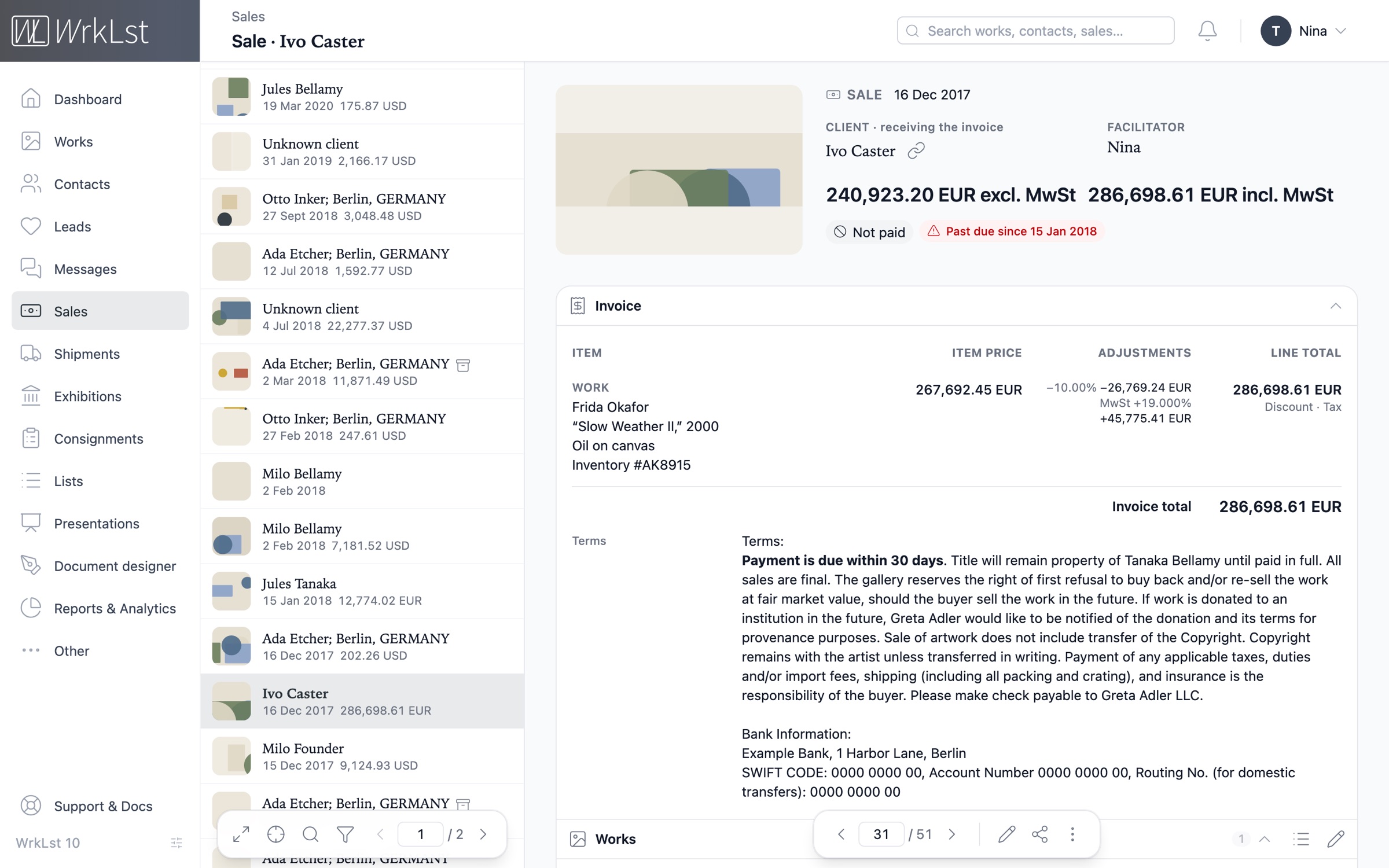
Offers, holds, sales and donations
Customize sales records to reflect your specific scenario — whether it’s an auction, a museum sale, a consultant-mediated transaction or a third-party sale. Put a work on hold for three hours and the hold expires automatically; promote it to a sale, release it or record a payment in one quick dialog.
Everything is fully searchable and linked to contacts and artworks: type the title of a work and every offer, hold, sale and donation that carried it comes up, giving you quick access to all relevant information from any perspective.
Every sale can start as a lead — create the offer, hold or sale from it, and the lead follows that record through to Sale. See the CRM
- Offer
- Hold
- Sale
- Donation
- External sale
- Museum sale
Patrick Potter
Telephone
Addresses
- Last contact
- 4 Sep 2026 · Meeting · Lea
- Log contact
- Stay in touch
- every 3 months · from their buying rhythm
Artist to offer: Nina SculptorHigh
Leads & waitlist
2Waitlists
#1Mary Painter20 Aug 2026
Leads
Mary Painter Quiet Field II, 2016
Sale · In contact · 4 Sep 2026
Messages
2Two works for the autumn show · 4 Sep 2026 · 2 works attached
Re: Tide Notes — framing · 12 Mar 2026
Invitations
3Sales & resales
2Sales & holds
Mary Painter Tide Notes, 1949
Sale · INV-2026-0142 · 21,420.00 EUR · paid in full
Nina Sculptor Night Interval
Hold until 30 Sep 2026
Connections
1Loan forms, terms and expiry notices
Easily manage all incoming, outgoing and third-party consignments in one place — dates, consignor and consignee, terms, the consigned works with their prices and commissions, and the documents. See at a glance which way the art is moving, between whom and for how long. A consigned work reads as unavailable everywhere else in WrkLst, helping you make informed decisions when browsing available works.
With the calendar view, you can easily track current consignments and upcoming expirations, and WrkLst sends an email and an in-app notification before a consignment expires.
- Incoming
- Outgoing
- Third-party
- Consignment forms
- Loan conditions
- Expiry notices
- Calendar view
September 2026
Ending September 2026
Sep 7, 2026 (23 d.): MP-104, MP-105, MP-111, MP-112 - Gallery/Casemore Gallery
7 Sep 2026 – 30 Sep 2026
Beginning September 2026
Sep 1, 2026 (14 d.): NS-021, NS-022 - Nina Sculptor/Gallery
1 Sep 2026 – 15 Sep 2026
Sep 17, 2026 (3 d.): PP-007 - Gallery/Fair booth
17 Sep 2026 – 20 Sep 2026
Running September 2026
Jun 12, 2026 (ongoing): MP-090 - Gallery/Kilnworth Collection
12 Jun 2026 – open-ended
Dashboard · Consignments
Sep 7, 2026 - Sep 30, 2026: Gallery/Casemore Gallery
7 Sep 2026 – 30 Sep 2026
Sales reports for every show
Open an exhibition or a consignment to see what it sold: the total, how much each colleague sold, and under each colleague every sale with its buyer, invoice and works. Your own sales, external sales and donations are grouped separately with their own totals, and a status bar shows where every work stands — sold, on hold, offered or available — by number of works or by value.
Track what the exhibition itself cost — shipping, framing, photography, the opening dinner — and download a cost report as a PDF or a spreadsheet.
- By exhibition
- By consignment
- By facilitator
- By channel
- Production & framing costs
Sales report 7
- Gross sales
- 61,400.00 EUR
- Number of sales
- 6
- Works sold
- 729%
of 24 works
Availability
WorksValue- Sold 7· 29%
- On hold 3· 13%
- Offered 2· 8%
- Available 12· 50%
Sales by facilitator
- ▴30,400.00 EUR
Anna Kiln
Sales: 2 · Works: 3
- 18,000.00 EUR
Patrick Potter
2 Oct 2026 · #2026-0142 · Works: MP-118, MP-121
- 12,400.00 EUR
Ruth Stonecutter
14 Oct 2026 · #2026-0163 · Works: MP-124
- ▾19,200.00 EUR
Lena Moss
Sales: 2 · Works: 2
- ▾11,800.00 EUR
Jonas Reed
Sales: 2 · Works: 2
Invoices, payments and your bookkeeping
Documents
Your letterhead
Generate invoices and statements from your own templates — logo, letterhead and typeface set once — itemised line by line, as Word, Excel, CSV or PDF.
Finance
Payment link
Add a pay link to the invoice that takes the collector to a card payment through your own Stripe or Shopify Payments account — whichever gives you the better rate — or to the invoice in QuickBooks, if you keep your bookkeeping there; the invoice document can print the link with a QR code. If you pass the card fee on, the Stripe or Shopify payment adds it — 3 % unless you set your own default under Settings › Invoicing, and any sale can have its own. When the collector pays through the link, the sale is marked as paid automatically, and the outstanding amount shows at the top of the sale.
Integrations
QuickBooks & Lexware
Send a sale to QuickBooks Online or Lexware Office in one click — the invoice and the contact, linked between WrkLst and your bookkeeping records.
Accounting
Income account
Choose the income account a QuickBooks invoice posts to, right on the sale — so a primary sale and a resale can be booked separately.
Sales
Multiple spaces
If you run more than one space, record which one a sale came from — with that space’s letterheads, and its own QuickBooks company if you keep separate bookkeeping.
Accounting
Invoice bookkeeping
Optional: invoices, partial, advance and final invoices per sale as numbered, locked documents, mistakes corrected with a cancellation invoice, a history per document and every document in the Invoices view — tuned to the rules of your country: Germany (GoBD, e-invoice, DATEV), Austria, the rest of the EU, the UK or the US. Off until you switch it on under Settings › Accounting; the free invoice documents keep working either way.
Accounting
E-invoice (ZUGFeRD)
In the EU, every invoice PDF carries the structured EN 16931 e-invoice inside it — ZUGFeRD, with the XRechnung profile in Germany — so it reaches your client’s bookkeeping as data, not as a picture, with the seller details § 14 UStG asks for and the right note for the small-business rule, the margin scheme, an export or an intra-Community supply.
Accounting
DATEV export & payments
Book payments per invoice — automatically from your bank, Stripe, Shopify Payments and QuickBooks Payments, or by hand — and, in Germany and Austria, hand your tax advisor a DATEV Buchungsstapel, SKR04 by default, with the payments optionally included as bank against debtor. A yearly archive and a verification run keep the trail intact.
Finance
Bank & payment gateway reconciliation
Every incoming payment in one stream, grouped by the account it landed on: your bank — read online from German banks over FinTS, linked in your own Stripe for a US checking or savings account, or taken from the statement file any other bank’s e-banking exports (camt.053, MT940, OFX, QIF, CSV or Excel, a spreadsheet’s columns matched once and remembered) — PayPal through its activity file, and Stripe, Shopify and QuickBooks. A payment that names an invoice or a sale and fits the amount is booked by itself, one transfer for several invoices included; the rest come with ranked suggestions you confirm with one click. Book part payments, take a booking back with a reason, or set a transfer aside. Optional per account.
No commission on your sales. Priced by the size of your archive.
WrkLst takes 0 % of your sales: no percentage, no listing fee and no payment margin. Card payments run through your own Stripe or Shopify Payments account — whichever gives you the better rate — so the money goes directly from the collector to you, and the only fees are the payment provider’s own.
Your subscription is priced by the number of records and users in your account, with no charge on the sale itself.