Studio and archive management for every work you made.
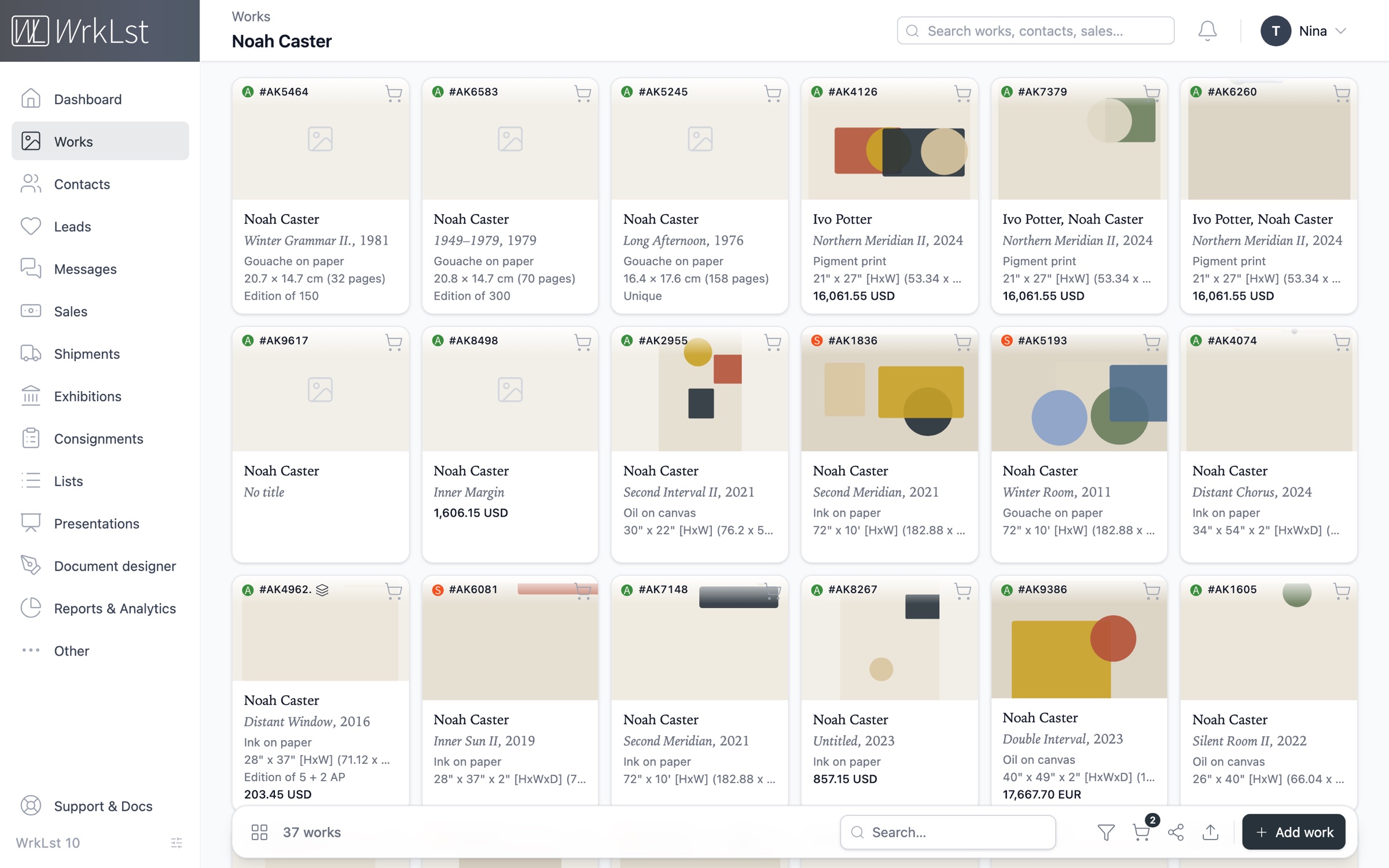
The archive, digitised.
Modern and professional artwork inventory management, built on decades of experience with galleries, museums, artists and collections. Manage each edition as one record — managed or custom, with its edition size, artist’s proofs and exhibition copies — while every copy carries its own number, price and location, so you always know which copy is where.
Easily bring your existing archive with you: import a printed catalogue as a PDF or an older spreadsheet, and review and approve every record before it is written.
“This software allows me to easily access and edit 50 years of an artist's oeuvre with all the different points of entry I need.”- Provenance
- Condition
- Location & shelf
- Exhibition history
- Editions & proofs
- Import from PDF & spreadsheets
Source PDF — page 3 of 8
Opens beside the table from a work's “Page” link
12 of 12 works selected from autumn-catalogue.pdf· 2 need a checkTarget inventory: AK· Back to column mapping
| Artist | Title, year | Medium | Dimensions | ||
|---|---|---|---|---|---|
| ✓ | Mary Painter | Quiet Field II, 2016 | Oil and wax on linen | 60 × 106 cm | |
| ✓ | Paul Printmaker | Signal Garden, 2024 | Screenprint on paper | 50 × 70 cm | |
| ✓ | Nina Sculptor | Night Interval, 2021/22 | Bronze | 32 × 18 × 12 cm | |
| ✓ | Otto Etcher | Harbour Plate, 2021 | Etching on paper | 24 × 30 cm | |
| ✓ | Vera Kilnworth | Kiln Study 4, 1998–99 | Glazed stoneware | 28 × 22 × 22 cm | |
Nothing is written until you import.
Where every work is, and who has it
Every work carries its location and shelf, and the sale that moved it records the current owner, giving you a complete overview of where each work is. Easily manage all incoming, outgoing and third-party consignments: attach the documents, track key timeframes, and view the consignment status of each work directly within its record.
Stay on top of deadlines with automatic email and in-app notifications for expiring consignments. Shipments hold pro-forma invoices and customs paperwork, with real-time tracking for FedEx, DHL and UPS.
- Location & shelf
- Owner from the sale
- Consignments in & out
- Expiry notices
- Calendar view
- Customs paperwork
- FedEx, DHL & UPS tracking
Sender
Berlin space
Recipient
Casemore Gallery
18 Sep 2026→6 days in transit→24 Sep 2026
Works · 2
Mary Painter Quiet Field II, 2016
AK1104 · oil on canvas · 120 × 90 cm
Mary Painter Tide Notes, 1949
AK1131 · oil on board · 40 × 50 cm
Documents
Customs declaration.pdf
Condition report.pdf
Proforma invoice
Temporary export for exhibition, to be returned
Carrier & tracking
- Carrier
- DHL Express
- Tracking number
- JD01 4600 0078
- Public tracking link
- wrklst.aftership.com/JD0146000078
Out for delivery
23 Sep 2026, 08:12 · San Francisco
Customs cleared
21 Sep 2026, 16:40 · Cincinnati
Processed at hub
19 Sep 2026, 02:05 · Leipzig
Picked up
18 Sep 2026, 14:30 · Berlin
Production costs, clearly laid out
Record production and framing costs on each work, together with who paid for them — in a studio, frequently not the artist.
Every exhibition and consignment shows these costs beside its sales report, totalled and grouped by who paid or by work. You see at a glance what a show or a single work has cost, and you settle with galleries and partners on clear figures rather than estimates.
- Production costs
- Framing costs
- Who paid
- Cost summary per show
- Clear accounts with partners
Client
Patrick Potter
Facilitator
Anna Kiln
Location
Berlin space
Invoice
The items on this invoice and how each one is priced
| Mary Painter Tide Notes, 1949 | 18,000.00 EUR | |
| Paul Printmaker Vessel and Ground, 2023 | 1,800.00 EUR |
- Subtotal
- 19,800.00 EUR
- Shipping
- 400.00 EUR
- VAT 19 %
- 1,220.00 EUR
- Invoice total
- 21,420.00 EUR
Invoices · 1
invoiced 21,420.00 EUR · paid 21,420.00 EUR · all 2 positions invoiced
RE-2026-0142Invoice12 Mar 202621,420.00 EURPaid
Payments received · 1
14 Mar 202621,420.00 EURBank accountPatrick PotterRE-2026-0142
Every artwork at true scale
Preview any work in a room at its real dimensions, and on iPhone, iPad and Android, place it at true size on your wall or floor through the camera. Add your own 3D model from a phone scan, and AR shows the real object rather than a placeholder box.
The presentation module showcases images and captions, with optional availability and prices, via a private link. Our apps for iOS and Android, designed for phones and tablets, present and browse works, exhibitions and lists — ideal for art fairs and studio visits, even when offline.
An enquiry from a presentation arrives as a lead, and leads follow more than sales: an exhibition proposal, a press feature, a gallery representation or an application, each through its own steps — Submitted, Shortlisted, Accepted for an application. See the CRM
- View in Room
- AR on iPhone, iPad & Android
- Your own 3D models
- Private links
- Images with captions
- iOS & Android apps
- Offline
Loading the room…
173 × 122 × 5 cm · drag to look around
#AK1105
Mary Painter
The Long Afternoon
Oil on canvas
173 × 122 × 5 cm
Flat, so it hangs — centred at eye level, the way it would be hung.
The archive of the œuvre.
Archive
ProvenanceRecord provenance line by line, each with a publishable flag, so the provenance you keep and the provenance you publish are one list.
Archive
Exhibition historySee every exhibition a work has been in as a clean line — title, venue and dates, each shown once, with the picture beside it.
Documents
BiographiesManage one CV per artist in a simple table, exported as documents, shown on your WrkLst website or synchronized with your own site through the WordPress plugin.
Security
Version historySee exactly what changed in a record — the old value and the new one, side by side — with your edits protected from clashes.
Presentations
Images with captionsExport each picture on its own page, sized to the artwork, with its caption underneath — as one PDF, or as single images with the caption inside the picture.
Languages
Sixteen languagesChoose your language under your name and it follows you to every computer you sign in on; Arabic reads right to left, and the interface turns with it.
Apps
Contacts on your phoneSync the WrkLst address book to the contacts app on your iPhone, Android phone or Mac — names, numbers and pictures, so you see who is calling.
Inventory
Editions & proofsTrack managed or custom editions with edition size, artist’s proofs and exhibition copies — one record on the bill whatever the size, one number, price and location per copy.
“The team there is brilliant and easy to work with, the program is easy to use and is an essential part of the studio's operation.”Organize your work, and you shape how it enters the canon.
A new gallery, a retrospective, a monograph, a curator’s studio visit: each of them starts from a complete catalogue of your work — every artwork you have made, where it went, who owns it today, where it has been shown and where it has been published. Keeping that archive yourself is the groundwork the recognition of an œuvre depends on — work that galleries have rarely done reliably, and rarely in the artist’s interest.
Whoever organizes this information systematically shapes how a work is read, exhibited and written into art history. With its own archive, a studio keeps that agency over the work and its canonization — whichever gallery, museum or publisher it works with.
As art historians and the people behind WrkLst, we have seen this again and again. So our advice is: take it into your own hands. Your archive stays with you when your situation changes — exactly when you need it most.
What WrkLst customers say.
“WrkLst has transformed how I engage with my collection. Having everything at my fingertips makes it easy to browse, share, and develop new projects wherever I am.”
 Konstantin Haubrok
Collector and Curator
“WrkLst is an essential tool for professional archiving and managing studio and estate workflows. The personalized support, from custom data migrations to day-to-day assistance, is fast, reliable, and invaluable to our work.”
 Ursula Davila-Villa
Co-founder of Davila-Villa & Stothart
“WrkLst is an affordable must-have for artists and collectors. It keeps my contacts and inventory organized, integrates seamlessly with Mailchimp and my website, and looks great doing it.”
 Mieke Marple
Artist, Writer, Art & Tech Consultant
Frequently asked questions
AI does the data entry for you: WrkLst reads the works out of a PDF, a scan or pasted work details and hands you finished records to approve. AI in WrkLst is optional and switchable — it runs only in features that say so, such as the import. How AI is used in WrkLst